You can put a portfolio website online for free, in about 15 minutes, using GitHub Pages. You do not need to buy hosting, and you do not need to be a developer.
This guide is for writers, designers, freelancers and beginners who want a simple, clean page with their name, work and contact details. By the end, you will have a live website at yourusername.github.io.
I built my own portfolio this way, with plain HTML and CSS, so I will keep every step simple and tell you what you should see at each point.
What you need before you start
- An email address
- A web browser
- A short bio and two or three work samples (links are fine)
- About 15 minutes
No coding experience is needed. You will copy one small file and change the words.
Step 1: Create your GitHub account
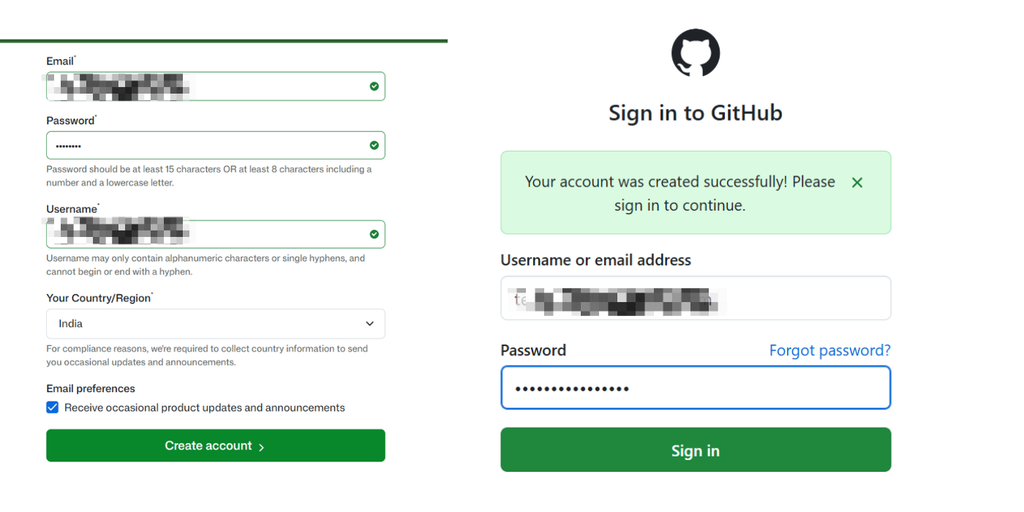
Go to github.com and sign up. Choose your username carefully, because it becomes part of your website address. For example, the username narensuryananda gives you narensuryananda.github.io.
After successfully creating the account, log in to the account, it may ask for OTP verification. Follow the required process to login.
Step 2: Create the repository
A repository is a folder on GitHub that holds your website files.
- Click the + or dropdown in the top-right corner of any GitHub page, then click New repository.
- In Repository name, type yourusername.github.io, using your own username. The name must match exactly.
- Keep the repository Public. GitHub Pages is free for public repositories on a free account.
- Turn on Add a README file.
- Click Create repository.
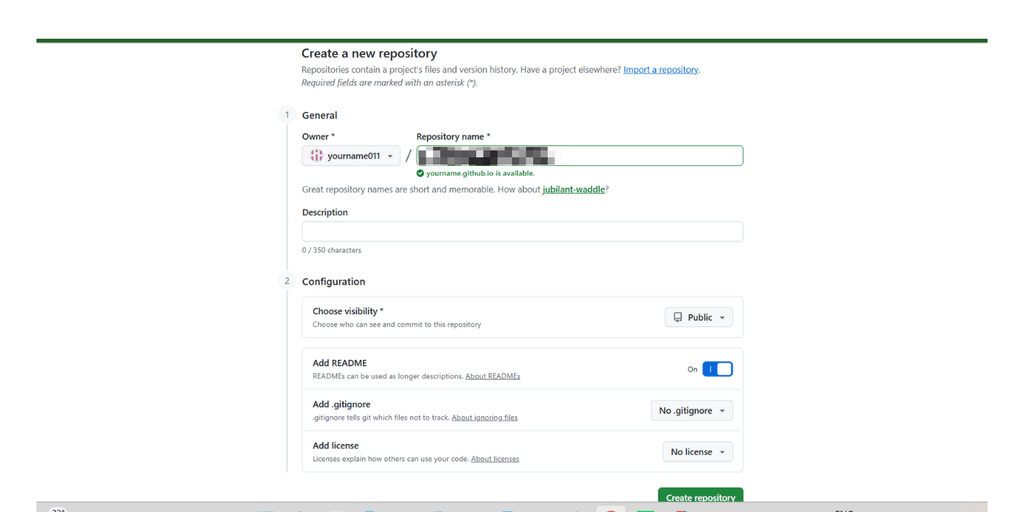
Common mistake: If the name does not match your username exactly, your site will not appear at the address you expect.
Step 3: Turn on GitHub Pages
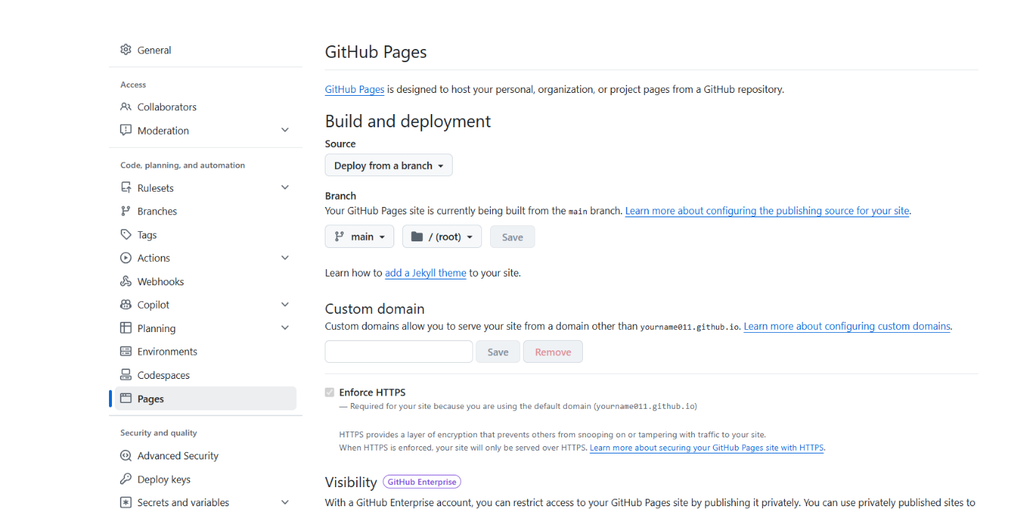
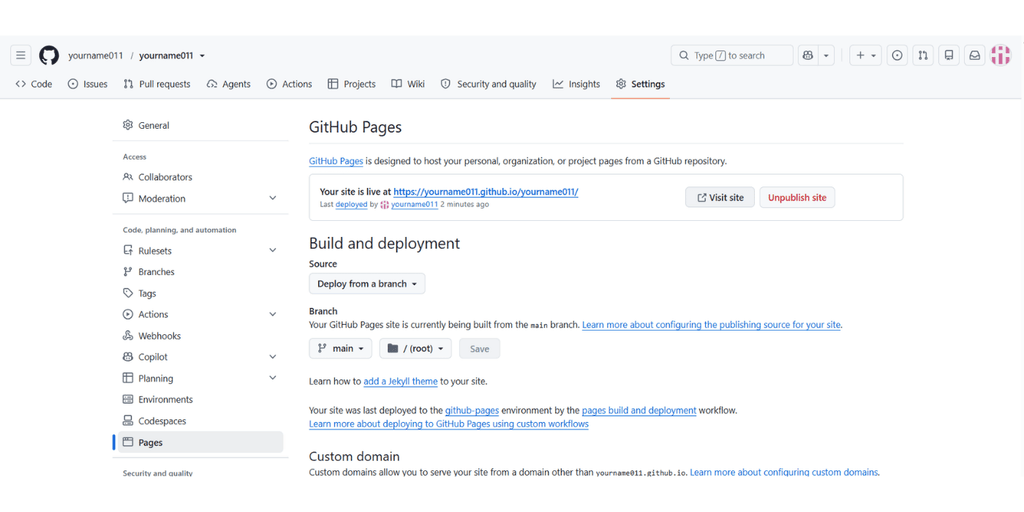
- In your new repository, click Settings.
- In the left sidebar, under “Code and automation”, click Pages.
- Under Build and deployment, set Source to Deploy from a branch.
- Under Branch, choose main (the folder should be / (root)) and click Save.
Step 4: Add your portfolio page
Now create the page itself.
- Go back to the Code tab of your repository.
- Click Add file, then Create new file.
- In the name box, type exactly index.html, all lowercase.
- Paste the code below, then change the words to yours.
- Click Commit changes, then confirm.
<!DOCTYPE html>
<html lang="en">
<head>
  <meta charset="UTF-8">
  <meta name="viewport" content="width=device-width, initial-scale=1">
  <title>Your Name | Technical Content Writer</title>
  <style>
    body { font-family: Arial, sans-serif; max-width: 700px; margin: 40px auto; padding: 0 20px; color: #1B2A4A; line-height: 1.6; }
    h1 { margin-bottom: 0; }
    h2 { margin-top: 36px; color: #C26B00; }
    a { color: #1B2A4A; }
  </style>
</head>
<body>
  <h1>Your Name</h1>
  <p>Technical content writer. I explain complex products in clear words.</p>

  <h2>About</h2>
  <p>Write two or three short sentences about who you are and who you help.</p>

  <h2>Work samples</h2>
  <ul>
    <li><a href="https://example.com/sample-1">Sample one: short description</a></li>
    <li><a href="https://example.com/sample-2">Sample two: short description</a></li>
  </ul>

  <h2>Contact</h2>
  <p>Email: <a href="mailto:you@example.com">you@example.com</a></p>
</body>
</html>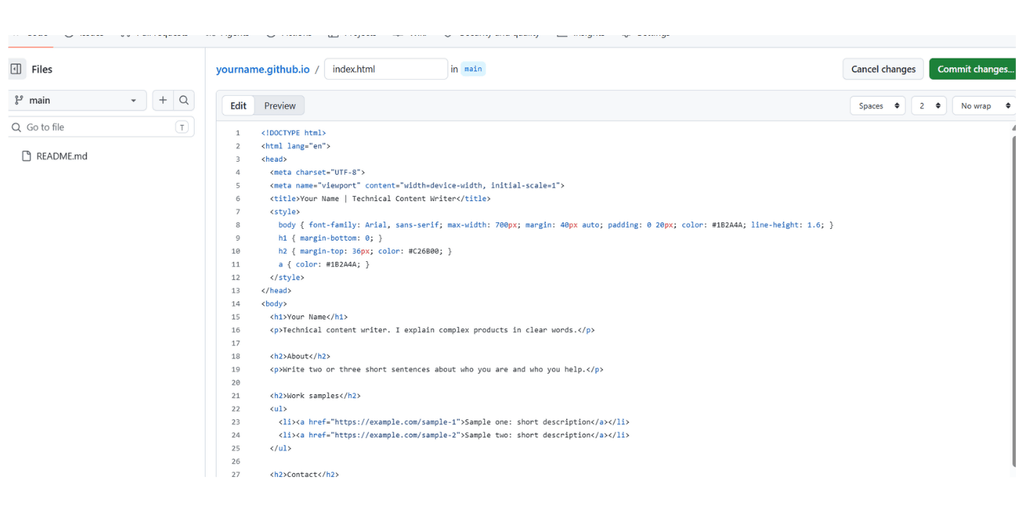
Step 5: See your site live
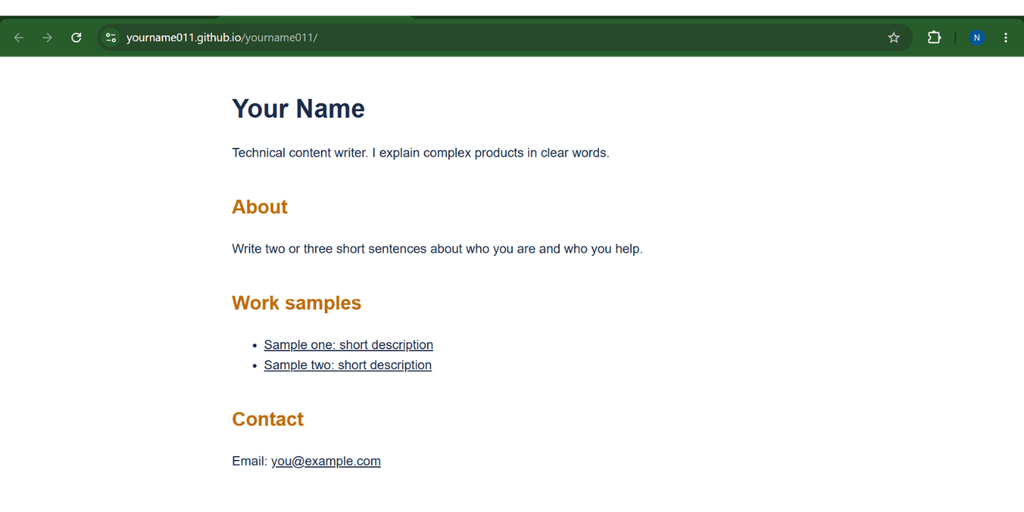
Open https://yourusername.github.io in your browser. Or again go to settings>pages and click on view site or click on the link given (reload the page if not showing).
Be patient: GitHub says publishing can take up to 10 minutes after you push a change. If you see nothing at first, wait a few minutes and refresh.
Congratulations! Now you have a live portfolio website at free of cost.
What to put on your portfolio page
A good portfolio is short. Visitors should understand who you are in ten seconds.
| Section | What to write |
| Headline | Your name and what you do, in one line |
| About | Two or three sentences: who you help and how |
| Work samples | Two to five links with a one-line description each |
| Services | What you offer, in plain words |
| Contact | One email address or one contact link |
Use real work. If you have no client work yet, write one or two sample pieces and link them.
How to update your site later
In your browser (easiest):
- Open your repository and click index.html.
- Click the pencil icon to edit.
- Make your change and click Commit changes.
- Wait a few minutes and refresh your site.
If your site does not show up
You see 404 (page not found): Check that Pages is on in Settings > Pages and a branch is selected, then wait about 10 minutes
You see your README text, not your page: Make sure the file is named index.html in lowercase and sits at the top level, not inside a folder
The address does not work: Check the repository name matches yourusername.github.io exactly.
Your change does not appear: Wait a few minutes, then hard refresh (Ctrl + Shift + R)
The page looks broken: Check you copied the whole code, including the first and last lines.
FAQs on Portfolio Website on GitHub Pages
Is GitHub Pages really free?
GitHub’s documentation says Pages works with public repositories on a free GitHub account. Check the current plan details before you rely on it for a business.
Can I use my own domain name?
Yes, GitHub Pages supports custom domains. That needs a domain you buy and a few settings, and I will cover it in a separate tutorial.
Do I need to know how to code?
No. You only need to copy one file and change the words in it.
What to do next
Your free portfolio is live. Next, you can add a custom domain, a nicer design, or a page for each project.
If you want a full business website with a blog, forms and strong hosting, see my AWS and web consulting service, or get in touch.
Need website for your business?
Tell me about your project and I will reply with a clear plan and a quote.

About the author
Hi, I’m Naren Suryananda. I’m a technical content writer with three years of experience and an AWS Certified Solutions Architect – Associate certification. I’ve written for both technical and non-technical audiences. Simplifying complex ideas is what brought out the writer in me—and it’s still what I enjoy most. That’s why I started Tech Script Lab, where I help SaaS and IT companies, startups, and agencies create value-driven content.